



Table of Contents Show
Smartphones have quietly become the most powerful scam delivery device ever created. They’re always on, always with us, trusted by default, and tightly linked to our money, identity, and social lives. That combination is gold dust for scammers. Before diving into detail, here’s a quick summary of the five most common smartphone scams you’re likely to encounter today: (1) SMS phishing (“smishing”) pretending to be banks, delivery firms, or government bodies; (2) one-ring and missed-call scams designed to make you call premium numbers back; (3) fake app and app-store scams that steal data or money; (4) social-engineering scams over WhatsApp, iMessage, or social media where criminals impersonate people you trust; and (5) QR-code scams that send you to malicious payment or login pages. Every one of these relies less on technical wizardry and more on psychology: urgency, fear, familiarity, and convenience.
What makes smartphone scams especially effective is that they exploit behaviour we’ve been trained into. We tap notifications without thinking. We trust branded messages. We assume app stores are safe. We believe messages from “contacts” more than emails from strangers. And crucially, we’re often distracted when using our phones, standing in a queue, watching TV, or half-asleep in bed. Scammers don’t need you to be stupid; they just need you to be human.
My mother almost fell for the “Mum I’ve changed my phone number use this one instead” tricks earlier this week. Luckily, it was discovered before anything bad happened.
Below, we’ll break down each of the five scams, how they work, why they’re so effective on smartphones specifically, and what you can do to protect yourself without becoming paranoid or tech-obsessed.
1. SMS Phishing (Smishing)
Smishing is the smartphone evolution of email phishing, and it’s arguably the most widespread scam on the planet right now. You receive a text message that looks like it’s from a legitimate organisation, your bank, a delivery company, HMRC, your mobile network, or even the NHS. The message usually claims there’s a problem: a missed delivery, a suspicious transaction, an unpaid tax bill, or an account that’s about to be locked.
The message includes a link. Tap it, and you’re taken to a website that looks convincing enough on a small screen. Logos are copied. Colours are matched. The URL is shortened or subtly wrong, but on a phone you’re unlikely to notice. You’re asked to log in, confirm details, or make a small payment. Once you do, the scammers have what they need: login credentials, card details, or both.
Smartphones make smishing far more effective than email phishing for several reasons. First, people trust SMS more. Texts feel personal and urgent in a way email rarely does. Second, phone screens hide technical clues. You don’t see full URLs, security certificates, or sender headers easily. Third, links are dangerously easy to tap by accident. One thumb movement and you’re already halfway into the scam.
What’s particularly insidious is how well smishing adapts to current events. During postal strikes, delivery scams spike. Around tax deadlines, HMRC scams explode. During cost-of-living crises, fake energy support messages appear. Scammers watch the news closely and adjust their scripts faster than most legitimate organisations can warn customers.
The simplest defence is behavioural, not technical. Treat unexpected texts with links as hostile by default. Legitimate organisations rarely ask you to click links or provide sensitive information by SMS. If you’re unsure, open a browser yourself and log in to the official site, or call the organisation using a number you already trust. Never use the link provided in the message.
For background on how phishing works more broadly, Wikipedia provides a solid overview: https://en.wikipedia.org/wiki/Phishing
2. One-Ring and Missed-Call Scams
This scam looks almost quaint, but it still works remarkably well. Your phone rings once and stops. The number is unfamiliar, often international. Out of curiosity, or concern, you call back. That’s the mistake. The number connects you to a premium-rate line, sometimes keeping you on hold or playing recorded messages while racking up charges.
On smartphones, this scam has evolved. Sometimes the missed call is followed by a text: “Sorry, missed your call.” Sometimes the number is spoofed to look local. Sometimes multiple missed calls create a sense of urgency. The psychological hook is simple: humans hate unresolved interruptions. A missed call feels like something unfinished.
What makes this scam effective is how little it asks of you. There’s no link to click, no form to fill in, no obvious deception. You’re doing what feels like a reasonable thing, returning a call. And because phone bills are often paid monthly and bundled, victims may not notice the charges until it’s too late.
Smartphones worsen the problem because they blur the line between local and international communication. We’re used to WhatsApp calls from abroad, roaming plans, and internet-based calling. The old mental red flag of “international number equals danger” has faded.
Protection here is mostly about habit. If you don’t recognise the number and they didn’t leave a voicemail, don’t call back. If it matters, they’ll contact you again in a clearer way. Most mobile providers also allow you to block premium numbers or international calls by default, an underused but very effective safeguard.
Europol covers the classic version of this scam: https://www.europol.europa.eu/sites/default/files/documents/wangiri_final_2.pdf
3. Fake Apps and App-Store Scams
We’re often told that app stores are safe, curated environments. That’s mostly true, but “mostly” isn’t good enough when money and identity are involved. Fake apps slip through every year. Some impersonate popular services like wallets, exchanges, fitness apps, or utilities. Others are clones of legitimate apps with subtle name changes or extra characters.
Once installed, these apps may do nothing obvious at first. They might show ads, mimic basic functionality, or even work as promised. Behind the scenes, however, they can harvest login credentials, record keystrokes, intercept SMS verification codes, or redirect payments. In some cases, the app itself isn’t malicious, but it aggressively pushes you toward paid subscriptions that are difficult to cancel.
Smartphones are particularly vulnerable here because apps feel safer than websites. We grant permissions reflexively: access to contacts, messages, storage, camera, microphone. On a desktop, you might question a random program asking for this level of access. On a phone, it’s normalised.
The small screen also makes it harder to scrutinise app details. Developer names, reviews, and permission lists are often skimmed or ignored. Scammers exploit this by padding reviews, copying branding, and choosing names that rank well in searches.
The best defence is a mix of scepticism and restraint. Download apps only when you genuinely need them. Check the developer carefully, not just the app name. Be suspicious of apps tied to money, crypto, or urgent services. And regularly review app permissions, most people would be shocked by how many apps still have access they no longer need.
If an app asks for permissions that don’t make sense for its function, that’s your cue to delete it.
4. Impersonation Scams via Messaging Apps
This is one of the fastest-growing smartphone scams, and arguably the most emotionally manipulative. You receive a message on WhatsApp, iMessage, or another messaging platform from someone claiming to be a friend, family member, or colleague. Often the opener is casual: “Hi Mum, I’ve got a new number.” Or: “Hey, can you help me quickly?”
My mother almost fell for the “Mum I’ve changed my phone number use this one instead” tricks earlier this week. Luckily, it was discovered before anything bad happened.
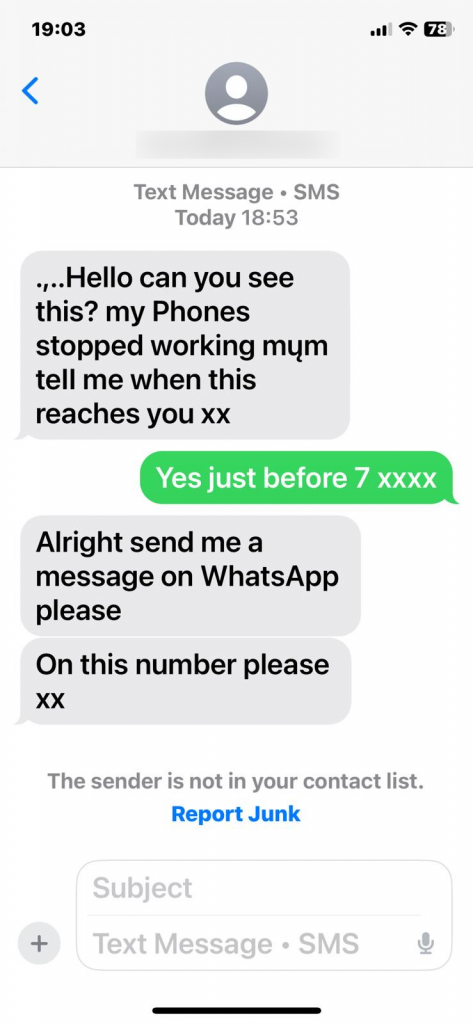
Once you reply, the story unfolds. They’re locked out of their bank. They need an urgent transfer. They’re stuck abroad. They need you to pay an invoice. The amounts are often small enough not to trigger immediate suspicion but large enough to hurt.
What makes this scam devastatingly effective is context collapse. On a smartphone, the message arrives in the same place as genuine conversations. The interface is identical. Your brain doesn’t switch into “skeptic mode” the way it might with email. And because messaging apps are designed for speed, you’re encouraged to respond quickly.
Scammers gather details from social media, data breaches, and previous scams to make their impersonation more convincing. They know names, relationships, even writing styles. In some cases, accounts are hijacked rather than impersonated, making the deception even harder to spot.
The defence here is a pause and a cross-check. If someone asks for money or sensitive information, verify through another channel. Call them. Ask a question only they would know. Don’t rely on the same app to confirm identity. It feels awkward, but it’s far less awkward than explaining to your bank, or your family, why the money’s gone.
5. QR Code Scams
QR codes exploded during the pandemic and never went away. They’re now everywhere: parking meters, menus, posters, payment requests. Scammers have noticed. A QR code is just a shortcut to a URL, and most people scan them without hesitation.
A fake QR code might be placed over a real one in a public place. It might arrive in the post pretending to be from a utility company. It might be sent digitally, claiming to link to a payment page or verification form. Once scanned, you’re taken to a site designed to steal login credentials or take a payment.
Smartphones amplify this risk because QR scanning is frictionless. There’s no visible link to judge. No hovering over URLs. No typing errors to slow you down. One scan and you’re there.
The danger isn’t QR codes themselves; it’s blind trust. People assume that if a code exists in a physical space, it must be legitimate. Scammers exploit that assumption relentlessly.
To protect yourself, treat QR codes like links in unsolicited messages. Be especially cautious with QR codes that lead to payments or logins. If possible, use official apps or type addresses manually for anything involving money. Many phones now preview URLs before opening them, use that moment to check whether the destination makes sense.
Why Smartphones Are the Perfect Scam Platform
Across all five scams, a few common factors keep appearing. Smartphones encourage speed over scrutiny. They compress information into small spaces. They blend personal, financial, and social communication into one device. And they condition us to respond immediately to notifications.
Scammers don’t need advanced hacking skills anymore. They need a good script, a basic website, and an understanding of human behaviour. The phone does the rest.
It’s also worth noting that smartphone security features (biometrics, app sandboxing, encryption) are actually quite strong. The weakest link isn’t the device. It’s the moment where a human is persuaded to override their own caution.
Practical Habits That Actually Help
You don’t need to become a cybersecurity expert to stay safe. A few habits go a long way. Slow down when something feels urgent. Be suspicious of unexpected messages, even if they look familiar. Separate verification from communication, don’t confirm identity using the same channel that contacted you. And remember that legitimate organisations can wait; scammers can’t.
If you ever feel embarrassed about nearly falling for a scam, that’s normal. These schemes work because they’re well-designed. The goal isn’t to never be targeted; it’s to never comply.
Smartphones aren’t going away, and neither are scams. But with a bit of awareness and a few behavioural tweaks, you can dramatically reduce your risk, without giving up the convenience that made smartphones indispensable in the first place.